Aaiya aaj baat krte h new scam/fraud ki jo ki JustDail/Indiamart jaisi websites ko use krke ho rha h. Jaise hi hum log koi product enquiry ke liye apna number submit krte h humme Justdail se call anne start ho jate h. Vo log apko apne rates btayege or whatsapp pe apni or company ki details bhejege jo ki sb fake hongi. Fake GST and fake address. Please google and justdail pe review check krle ekbaar jarur. Ye log apko kaffi low proce offer krege or payment advance bolege.
Monday, 17 June 2024
Justdail SCAM calls | Justdail product enquiry scam | Fraud Alert on Justdail | Indiamart SCAM calls
Aaiya aaj baat krte h new scam/fraud ki jo ki JustDail/Indiamart jaisi websites ko use krke ho rha h. Jaise hi hum log koi product enquiry ke liye apna number submit krte h humme Justdail se call anne start ho jate h. Vo log apko apne rates btayege or whatsapp pe apni or company ki details bhejege jo ki sb fake hongi. Fake GST and fake address. Please google and justdail pe review check krle ekbaar jarur. Ye log apko kaffi low proce offer krege or payment advance bolege.
Monday, 6 November 2023
How to vlookup values across multiple worksheets? | VLOOKUP Formula in Excel with Multiple Sheets | Match value across multiple sheets in excel
We can achieve this using INDIRECT function is excel.
Vlookup multiple sheets with INDIRECT:
To use this array formula, you should give these three worksheets a range name, please list your worksheet names in a new worksheet, such as following screenshot shown:

1. Give these worksheets a range name, select the sheet names, and type a name in the Name Box which next to the formula bar, in this case, I will type Sheetlist as the range name, and then press Enter key.

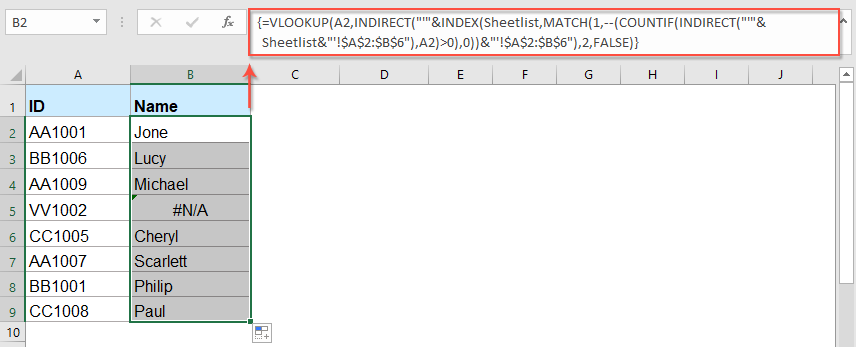
2. And then you can enter the following long formula into your specific cell:
3. And then, press Ctrl + Shift + Enter keys together to get the first corresponding value, then drag the fill handle down to the cells that you want to apply this formula, all the relative values of each row have been returned as follows:

Notes:
1. In the above formula:
- A2: is the cell reference which you want to return its relative value.
- Sheetlist/Lookup_sheets: is the range name of the worksheet names.
- A2:B6: is the data range of the worksheets you need to search.
- 2: indicates the column number that your matched value is returned.
2. If the specific value you lookup doesn't exist, a #N/A value will be displayed. if you want to replace #N/A with specific value this can be handled with IFNA as shown below:
=IFNA(VLOOKUP($V2,INDIRECT("'"&INDEX(Lookup_sheets,MATCH(1,--(COUNTIF(INDIRECT("'"&Lookup_sheets&"'!$A$2:$B$300"), $V2)>0), 0))&"'!$A$2:$B$300"), 2, FALSE),"Not Found")
Tuesday, 19 October 2021
How to find email addresses for People | Find email addresses for LinkedIn person | How to use Signalhire
You can find the email address for any LinkedIn profile URL/person with using help of few tools list below:
- Signalhire
- Lusha
- Rocketreach
- any many more
| Register |
- Login into SH.
- Search for a person.
- It shows a result list based on matching criteria.
- Click on the "REVEAL CONTACT" button to see details for a matched person
View information - Now you can see the data for a person here.
Lama Dal lake trek via Kareri lake | Kareri lake trek | Lama dal lake trek
General Intro :
Dal Lake is considered to be a sacred spot that is located at 3990 m above sea level. The lake part of the holy pilgrimage (Lord Shiva) is called Naun (Regional Bath). This lake is the largest and the deepest in the area with a circumference of about 2.5 Km. This lake lies amidst bare rock. ‘Lama Dal’ means a long lake.
Trekking Route :
Lama Dal is reachable from 3-4 different routes which start from different parts of Chamba and Kangra district including the Kareri lake route, Triund - Indrahar Pass, and Kuur village near Chhatrari(Chamba). I did this via the Kareri lake route. Started from Kareri village with a group of 5 friends at around 1:30 PM. It is around 14km trek which includes 3km of road journey which can be done by car/bike also. to reach Kareri lake. We did our first night halt near the iron bridge which is around 2hrs before Kareri lake. Reaching Kareri lake is the easiest part of the whole trek route.
Below are some of the images from the trip:
Kareri Lake Trekking | How to reach kareri lake | Seven Lake trekking | Lama Dal lake trek | Minkianai Pass Trek
Kareri Lake is a beautiful place to visit which is like a scene taken from a movie. Lake is also known as Kumarwah Lake. Kareri Lake is a freshwater lake that is situated about 11 kilometers above from village called Kareri near Dharamshala, Kangra Distt of Himachal Pradesh. Located at an altitude of 3000~ meters above sea level.
The Kareri Lake is a popular trekking destination along with being a major sightseeing attraction. You will often find Gujjars and Gaddis who reside in the nearby villages.
In this blog, we will cover the trekking starting from Kareri village to Lama Dal lake via the Minkianai pass. I've come up with a pictorial map of the trekking route to help you understand this better.
Now I'll explain all the numeric points above, I'm also trying to put images for better understanding.
- Kareri Village base point: This is the base point for your car parking and basically starts your trek.

Base Village - Bridge point: This point is connected via road but not good for 4 wheels, you can reach here using Bike but do not take the risk to come by Car. From here the actual 11km trekking starts to reach Kareri lake. This is Easy rated trek till Kareri lake.

Trek mates - Kareri Lake: Located at approx 3000 meters above sea level. This place is very beautiful and love at first sight for lake lovers.

Lake view - Minkiani Pass: This top is located at approx 4267 Meters above sea level. It takes around 4hrs to reach this point from Kareri lake. This part is on the little hard side as you have to climb through dry rocks and the climbing is too upward. The top view is very beautiful from this point and it will heal all your trekking pain.
- Nagara Dal Lake: Located at the height of approx 3680 Meters. This is considered the best halt point to start your journey towards Lama Dal lake in the early morning as this place is on the side of a small lake and has space for your camping. No woods around for fire. Carry some portable gas stoves with you for the best experience.

Mankiani pass to Nagara dal lake 
Nagara Dal Lake 
Camping at Nagara Dal lake - Unknown Lake: This Trek is a combination of around 7 small-small lakes so I don't remember all names 😁.
- Kali Kund lake: This is also the beauty of this trek you will see all black stones and rocks here along with the black water. Don't be scared 😜
- Lama Dal/Lam dal Lake: Finally our destination is here! This lake is located at a height of approx 3970 meters. This lake is considered a holy place by locals. This is a fresh water lake in the lap of mountains. You will love the view here.
- If you are planning to visit lama dal lake plan your trip for at least 3 days.
- Carry portable gas stove/woods if you are planning to visit Lama dal lake. No trees start from Nagara Dal lake.
- Do not try to test your swimming skills in any lake 🙏.
- Try to cover the trek during day times only.
Tuesday, 4 May 2021
S3 file upload using boto3 in python
import boto3
import requests
access_key='key'
secret_access='key'
region = 'region'
s3 = boto3.client('s3', region_name=region, aws_access_key_id=access_key,
aws_secret_access_key=secret_access)
s3.upload_file('source','bucket','destination/filename')
print("uploaded")
S3 file download using boto3
import boto3
import requests
access_key='key'
secret_access='key'
region = 'your-region'
s3 = boto3.client('s3', region_name=region, aws_access_key_id=access_key,
aws_secret_access_key=secret_access)
s3.download_file('bucket','folder/file','download-destination')
print("downloaded")
S3 list all files in bucket
import boto3
access_key='your-key'
secret_access='your-key'
region = 'ap-south-1'
s3 = boto3.client('s3', region_name=region, aws_access_key_id=access_key,
aws_secret_access_key=secret_access)
for key in s3.list_objects(Bucket='bucketname',Prefix='folder/')['Contents']:
print(key['Key'])
Friday, 5 February 2021
How to generate random color hex code in database ? | Generate random hex code in database.
You can achieve this by using below query:
"select '#' + CONVERT(VARCHAR(max), CRYPT_GEN_RANDOM(3), 2)"
Monday, 11 January 2021
How to Uninstall New Microsoft Edge in Windows 10 ? | How to get old version of Microsoft edge ?
Below is step by step guide to uninstall the Microsoft Edge updates and get old version back :
- Open Cmd prompt.
- Cd to "C:\Program Files (x86)\Microsoft\Edge\Application".
- Do a 'dir' and check for your Microsoft Edge version number (you can also view it in file explorer.)
- Open the Edge version and Locate 'Installer' foldr inside it i.e. (C:\Program Files (x86)\Microsoft\Edge\Application\Version_Number\Installer)
- Make sure you at above mention path in CMD.
- Now hit "setup.exe --uninstall --system-level --force-uninstall" and you are done !
Sunday, 5 January 2020
Convert DOC to PDF using python
import sys
import os
import win32com.client
wdFormatPDF = 17
in_file = os.path.abspath(sys.argv[1])
out_file = os.path.abspath(sys.argv[2])
word = win32com.client.Dispatch('Word.Application')
doc = word.Documents.Open(in_file)
doc.SaveAs(out_file, FileFormat=wdFormatPDF)
doc.Close()
word.Quit()
Execute from command line :
>python doc2pdf.py test.docx test.pdf
import comtypes.client
wdFormatPDF = 17
in_file = os.path.abspath(sys.argv[1])
out_file = os.path.abspath(sys.argv[2])
word = comtypes.client.CreateObject('Word.Application')
Sunday, 22 September 2019
AWS S3 upload files | Upload file to S3 using python | Lambda upload files to S3 bucket
We can upload data to s3 using boto3 library. Here is code which also works for AWS lambda functions.
Below is sample code to upload files to S3 using python :
import json
import boto3
import requests
access_key='your_access_key'
secret_access='your_secret_access'
region = 'your_region'
s3 = boto3.resource('s3', region_name=region, aws_access_key_id=access_key,
aws_secret_access_key=secret_access)
def s3_uplaod(bucket, domain,content):
file_path = '{}/{}'.format(domain,"name_of_file")
object = s3.Object(bucket, file_path)
object.put(Body=content)
def main(job):
try:
bucket = 'your_bucket_name'
domain = 'sub-folder_inside_bucket'
content = 'local_location_of_file'
s3_uplaod(bucket, domain,content)
except Exception as e:
print(e)
def handler(event, context):
main(event)
handler('a','a')
Notes:
- You can replace required parameters like keys and bucket name.
- domain : used where we have folder inside bucket.
- if path doesn't exist inside bucket it will create required path.
- You can skip handler part if not using code for AWS lambda functions.
Saturday, 14 September 2019
Add Crawlera proxy to pyton script | Using crawlera proxy
Below is small example in how to use crawlera proxy with our python script which also works for AWS lambda functions :
import requests
from requests.packages.urllib3.exceptions import InsecureRequestWarning
requests.packages.urllib3.disable_warnings(InsecureRequestWarning)
class JobCreator():
def getProxies():
url = "http://httpbin.org/ip"
proxy_host = "proxy.crawlera.com"
proxy_port = "8010"
proxy_auth = "yourauthkey"
proxies = {"https": "https://{}@{}:{}/".format(proxy_auth, proxy_host, proxy_port),
"http": "http://{}@{}:{}/".format(proxy_auth, proxy_host, proxy_port)}
return proxies
def call(self):
proxies = getProxies()
html = requests.get('https://api.myip.com', verify=False, proxies=proxies)
print(html.content)
# Lambda Handler
def handler(event, context):
print("Job Creation Initiated.")
obj = JobCreator()
obj.call(event)
print("Jobs Created Successfully.")
#handler('test','test')
#call()
To know more on how to use AWS lambda functions yo can leave messages in below comment box.
Friday, 13 September 2019
Postgres Load large file into database | Load large CSV to postgres database
export PGPASSWORD='your_password'; psql -h hotsname -p port-U username -d database -c "\copy table_name FROM 'location of file' WITH DELIMITER '|' CSV HEADER;"
Just put in the parameters required. You can adjust the delimiter as needed like ',' or ';'
Wednesday, 11 September 2019
Postgresql split column into rows | Postgres delimited split rows
Table structure:
| Roll No | Name | Hobbies |
|---|---|---|
| 1 | Ram | Dance,Playing |
| 2 | Alex | Music,Movies,Internet |
Saturday, 13 July 2019
iPhone auto connecting VPN problem Solved | iPad auto connecting VPN | iPhone/iPad internet not working
- Go to settings.
- Then click on general.
- Click on VPN.
- Check for already connected VPN with blue tick or look for (i) button.
- Click (i) button and swipe left to "Connect On Demand".
- You are done now internet will work fine.
Sunday, 23 December 2018
Where to Eat in Jaipur | Top places for foodies in Jaipur

- Sweets :
- Laxmi Mishthan Bhandar (LMB)
- Anandji Sweets ( near Apex Hospital )
- Kulfi and Juice:
- Ramchandra Kulfi Bhandar & Juice Centre ( shop no 221/222 )
- Lassi :
- Lassiwala (MI Road, Jayanti Market).
Thursday, 24 May 2018
How to Remove Lines Not Containing “Emails/@" in Notepad++ or Excel ?
I want only those lines which include @ in it ?
Jasmeet Singh
Jasmeet Singh Singhjassu1004@gmail.com
· 16h
Vandana Gupta
Vandana Gupta vandygupta77@gmail.com
· 1h
DeVesh UDit
DeVesh UDit deveshudit@gmail.com
· 17h
Ritesh Singh
Ritesh Singh ritesh894@gmail.com
· 14h
Sarthak Vij
Sarthak Vij sarthaksv95@gmail.com
Solution in Notepad++:
This can be achieved by using Find and Replace in Notepad++.
Here is how :
- Ctrl+H
- Find what: ^[^@]+$
- Replace with: EMPTY
^ : begining of line
[^@]+ : 1 or more character that is not @
$ : end of line
Solution in Excel :
This can be done by using text filter in excel:
- Select row containing data.
- Click filter.
- Select text filter then contains.
- Enter @ in contains section.
- As a result it will return all emails.
Prashar Lake Things to know
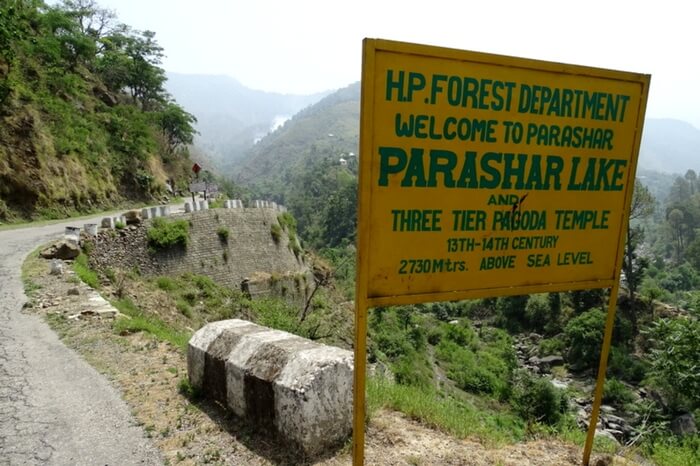
Prashar Lake is a beautiful lake located in the Mandi District of Himachal Pradesh at an altitude of 8,956ft and is an abode for nature lovers and pilgrims alike, and offers its visitors tranquility and beautiful views of the Dhauladhar, Pir Panjal and Kinnauri mountain ranges.
![]() |
| Source : Google Images |
How to reach :
There is one road in and out of Prashar and connects it to both Mandi (49km) and Kullu (64km). While the road is single lane and in bad condition for last few kilometers, it offers pristine views of the entire valley and makes for a wonderful drive.
Delhi ==> Chandigarh ==> Mandi ==> Prashar
- By Bus From Mandi : From Mandi there is a local HRTC bus to Prashar Lake, which leaves each day from Mandi at 8:10am and starts its journey back to Mandi from Prashar at 1:10pm.
- Trekking: Prashar to Baggi, 7km downhill trek.
Where to Stay :
- Forest department has 2 guest houses located a little over a kilometer from the lake, and has 6 rooms available for tourists. For booking you can contact DFO Mandi at 01905-23536 and contact the caretaker, Mr. Roop Singh at +91– 9418411746.
- PWD Rest House: PWD Rest House too is located a kilometer from the lake and can be booked by contacting Executive Engineer, Padhar at 01905-222151.
- Temple Guest House ( cheapest ).
- Camps.
Thursday, 10 May 2018
Cp.no 5812 of 2015_ So( G-111)SE 2L/PS/HC/3-859/18 | High Court order No fees for Holidays True or False ?
So( G-111)SE 2L/PS/HC/3-859/18
Date 05-03-2018
इसके लिए अभिभावक पुलिस में शिकायत भी कर सकते है। अगर किसी ने एडवांस में फीस जमा कर दी है तो वापिस मांग लें या फिर अगले महीने में एडजस्ट करा दे। स्कूल फीस ना दे या एडजस्ट ना करे तो पुलिस में शिकायत करे। पुलिस ना सुने तो CM विंडो पर शिकायत करे।