Option Explicit

Private Declare Function URLDownloadToFile Lib "urlmon" _
Alias "URLDownloadToFileA" (ByVal pCaller As Long, _
ByVal szURL As String, ByVal szFileName As String, _
ByVal dwReserved As Long, ByVal lpfnCB As Long) As Long

Dim Ret As Long

'~~> This is where the images will be saved. Change as applicable
Const FolderName As String = "C:\Temp\"

Sub Sample()
    Dim ws As Worksheet
    Dim LastRow As Long, i As Long
    Dim strPath As String

    '~~> Name of the sheet which has the list
    Set ws = Sheets("Sheet1")

    LastRow = ws.Range("A" & Rows.Count).End(xlUp).Row

    For i = 2 To LastRow '<~~ 2 because row 1 has headers
        strPath = FolderName & ws.Range("A" & i).Value & ".jpg"

        Ret = URLDownloadToFile(0, ws.Range("B" & i).Value, strPath, 0, 0)

        If Ret = 0 Then
            ws.Range("C" & i).Value = "File successfully downloaded"
        Else
            ws.Range("C" & i).Value = "Unable to download the file"
        End If
    Next i
End Sub
Showing posts with label URL to IMAGE. Show all posts
Showing posts with label URL to IMAGE. Show all posts
Tuesday, 22 August 2017
Convert URL to Image in Excel and save to Folder | URL to Image

Friday, 25 November 2016
Convert URL to Image Excel | URL to IMAGE
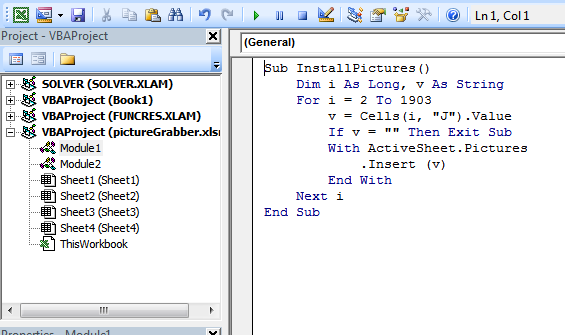
This can be achieved in Excel using the Macros.
Macros are very easy to install and use:
- ALT-F11 brings up the VBE window
- ALT-I ALT-M opens a fresh module
- Paste the stuff in and close the VBE window
"""""""""""""""""""""""""""""""""""""""""""""""""""""""""""""""""""""""""""""""""""""""""""
Sub InsImg()
Dim URL As Range
For Each URL In Range("F2", Cells(Rows.Count, "F").End(xlUp))
With URL.Parent.Pictures.Insert(URL.Value)
.Left = URL.Offset(0, 1).Left
.Top = URL.Offset(0, 1).Top
URL.EntireRow.RowHeight = .Height
End With
Next
End Sub
""""""""""""""""""""""""""""""""""""""""""""""""""""""""""""""""""""""""""""""""""""""""""""
In above code F2 is name of the cell in which URL is present.
When you will start conversion it will continuously go and hit the Google , if the URL's in large amount then it will through an error after few minutes.
If you save the workbook, the macro will be saved with it. If you are using a version of Excel later then 2003, you must save the file as .xlsm rather than .xlsx
To remove the macro:
- bring up the VBE window as above
- clear the code out
- close the VBE window
To use the macro from Excel:
- ALT-F8
- Select the macro
- Touch RUN
To learn more about macros in general, see:
and
Macros must be enabled for this to work!
Subscribe to:
Posts (Atom)